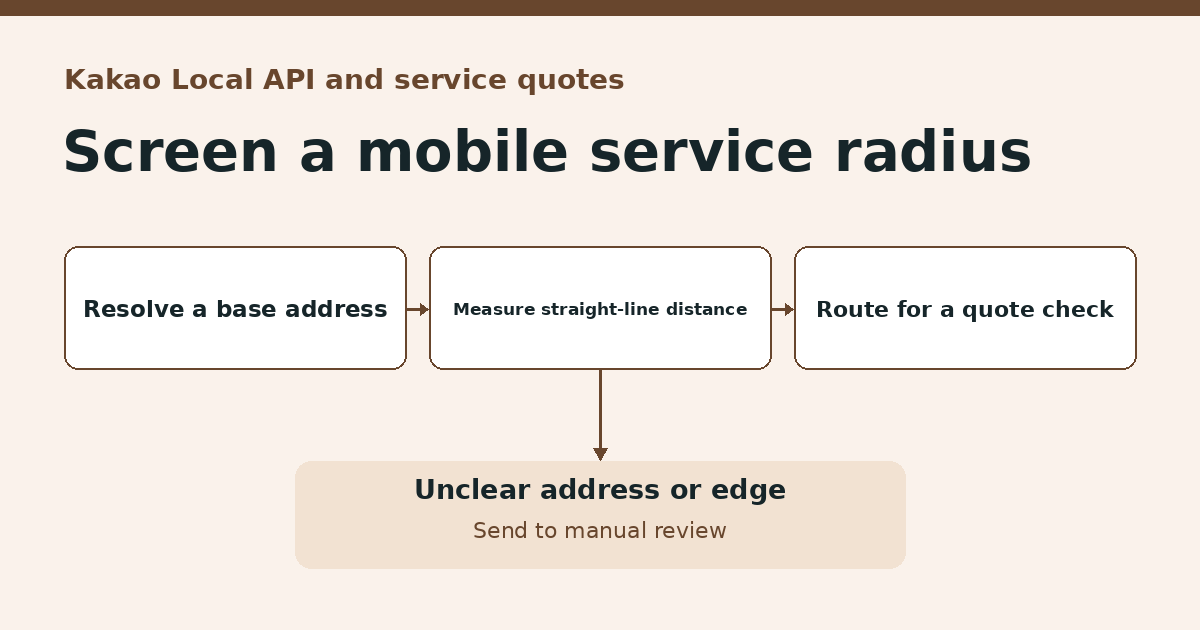
If your mobile service team in Korea uses a radius to decide which quote requests it can handle, geocode the confirmed base address with the Kakao Local API and calculate straight-line distance from your service hub. Use the result to route the inquiry. Ambiguous matches, boundary cases and appointments requiring a travel estimate should go to staff before anyone confirms a price. [1]
Define your operating rule before building the automation
Record the approved service hub, a radius in kilometers, and a review band around the boundary. A business might choose a fictional three-kilometer radius and a review band of 250 meters on either side to test the workflow. Set the real values from your own service economics and travel experience.
Send only the building-level address text needed for the lookup. Keep names and apartment-unit details out of the geocoding query and diagnostics. Inspect the returned candidates and hold the job if your rules cannot identify a matching base address. Kakao documents address conversion and the coordinate response fields. [1]
Convert the candidate into a review decision
- Parse the longitude from
xand latitude fromy. Keep a consistent coordinate order for the hub and the request. Reject out-of-range values, then measure distance with a geographic distance function. [1] - Route clear in-radius results to quote preparation. Send results close to the boundary to staff for review. Make out-of-radius results a separate queue decision so an operator can consider an alternate hub or a special job.
- Use straight-line distance for screening. For appointment length, practical access or a travel surcharge, check a route and operational constraints such as bridges, parking or building access separately. Kakao documents route products apart from address conversion and publishes usage and quota information by service. [2]
Keep uncertain jobs visible
If geocoding is unavailable, keep the quote request open and label its location as unchecked. Do not assign it a distance from a default coordinate. A replay should update the same inquiry with a match or a manual decision once service returns.
Test with synthetic coordinate pairs that fall clearly inside, on the boundary, and outside. Add a swapped-coordinate case, two look-alike candidate addresses, and a simulated quota error. Use a preview-only queue until staff confirm the decisions and no customer receives an automatic price or appointment.
Official sources and claim checks
Official documentation opened and checked on November 17, 2026 (KST).
- The address search endpoint returns matching documents and coordinates with x as longitude and y as latitude. Kakao Local REST API guide
- The quota documentation describes app-specific usage and separates address-to-coordinate conversion from route products. Kakao Developers quota guide
Testing and open checks
No Kakao app, geocoded address, travel route, or account quota was tested. Before using real inquiries, check your Kakao account’s quota, terms and approved handling for submitted location data. Examples and test steps are documentation-based and use synthetic inputs.