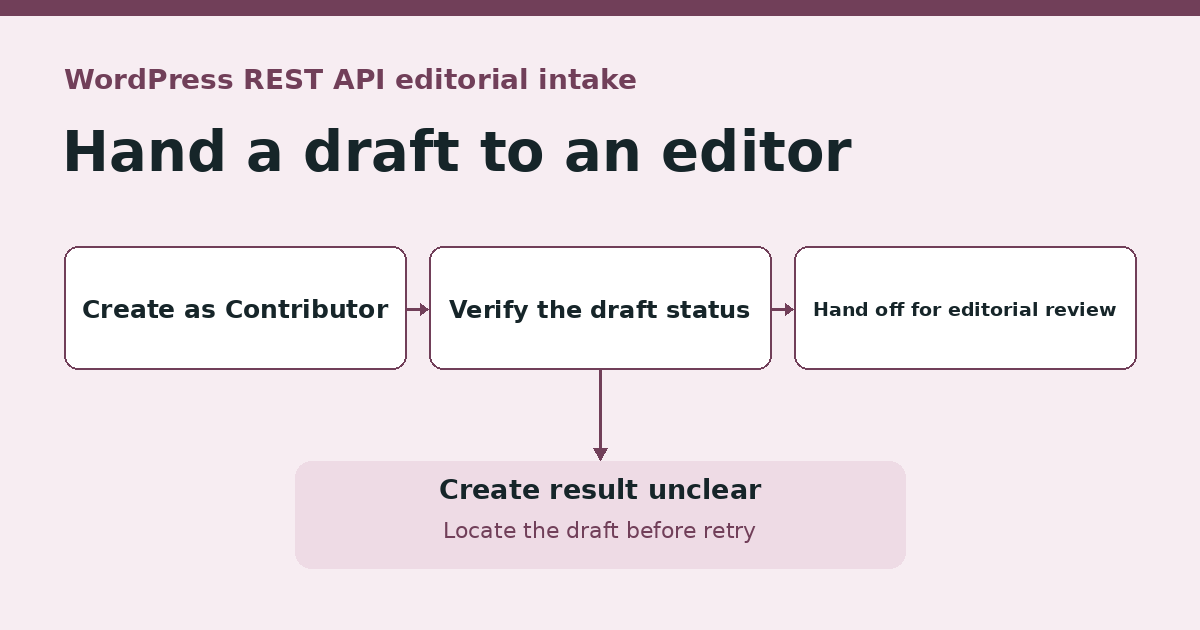
To import text into a Korean business’s WordPress site for editorial review, authenticate as a dedicated Contributor and explicitly request draft when creating the post. Save the returned post ID, retrieve it again to verify its status, and leave approval with an editor. The default Contributor role can manage its own posts and lacks publishing permission. [1][2][3]
Give the importer the minimum access it needs
Create an account for the text integration and verify the actual role capabilities on the staging site. Generate a separate Application Password for that account and store it server-side. WordPress ties the credential to the account and allows you to revoke the credential individually. Use the supported HTTPS authentication method. Keep secrets, draft excerpts and Authorization headers out of shared run logs. [1][2]
Scope the first rollout to standard text posts. Keep media uploads, featured images and final publication under the editorial workflow. For a bilingual Korean shop or publication, include a stable source record and language label in the internal handoff so the editor can open the intended draft. Preview Hangul, English punctuation and paragraph boundaries before progressing.
Create once and verify the intended draft
- Send the post title and content with
status=draftto the Posts endpoint. Store the returned post ID against the source reference. Retrieve that post as an authorized user and check its ID, text and status before marking the handoff ready. [3] - If the create response is lost, place the source in an unknown state. Have an editor locate and verify the matching draft before authorizing another create. A similar title can belong to a different language edition or version.
- When a previously handed-off source changes, show the editor which version changed. Confirm ownership and current draft status before any authorized revision, and keep the integration from writing changes after the editor moves the post forward.
Test permissions and recovery on staging
With fictional articles, verify that draft creation and read-back succeed. In the isolated staging environment, verify that the integration identity cannot publish or schedule a post and cannot edit another author’s draft. A custom role or plugin can change behavior, so correct the capability issue on staging before enabling imports. Simulate a timeout after creation and confirm that the same source does not create a duplicate. Revoke the integration credential and verify that further requests fail. [1][2][3]
Official sources and claim checks
Official documentation opened and checked on November 17, 2026 (KST).
- Application Passwords are individually revocable API credentials tied to a user. The handbook documents Basic Authentication over HTTPS. WordPress Application Passwords Handbook
- The default Contributor manages their own posts and lacks the capability to publish them. Plugins or custom role changes must be checked on the actual site. WordPress Roles and Capabilities
- Posts can be created and retrieved by REST API, and the documented status field distinguishes draft, pending, future, private and publish. WordPress REST API Posts reference
Testing and open checks
No WordPress site was written to, and no credential, plugin configuration, or REST permission was tested. The instructions assume default WordPress post capabilities and should be verified on staging. Examples and test steps are documentation-based and use synthetic inputs.