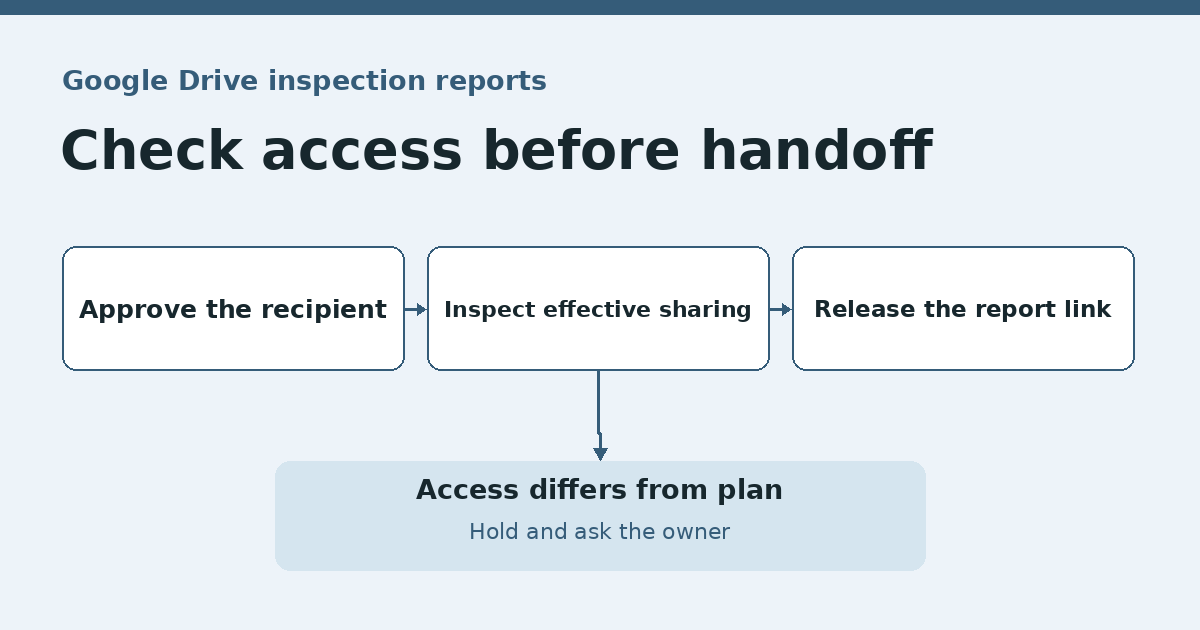
Before an automation sends a Google Drive inspection-report link, check the approved recipient and the report’s effective sharing. Hold the release if it has unexpected access or if the intended recipient cannot open it. The file link alone does not establish who can view the report; Drive evaluates access through permissions and the signed-in identity. [1]
Bind the report to an approved recipient plan
Record the work-order reference, completed report file ID, approved audience and intended access level. Have an authorized operator confirm the recipient through the normal customer record. Keep report contents and email addresses out of broad release logs.
Use an output location reviewed for that audience. A newly generated report can inherit access from its parent, and a move can change the permissions applied to it. The sharing guide documents propagation and current-user capabilities. Check the relevant parent and drive context when validating the file. [1]
Make release conditional on the actual access result
- Read the report’s permissions with the authorized integration and follow every returned page. Account for shared-drive context where applicable. [2]
- Compare visible grants and inheritance with the approved plan. An anyone or domain grant may be wider than intended. Group membership and organizational policy may need administrator confirmation.
- Verify the file identity and access using a designated recipient test account in the pilot. Keep the distinction between the integration’s own capabilities and another user’s access. Drive exposes capabilities for the caller, so they do not prove that an external customer can open the report. [1]
Record the check result and report version before releasing the handoff task. Recheck when the report moves or the audience changes.
Recover from access that differs from the plan
If the intended person is blocked, ask the authorized owner to review the relevant permission or sharing policy. If access is broader than planned, hold the link and review the source of that grant. An inherited grant can require action at its parent or a supported limited-access configuration. A broad parent change can affect other work, so keep the proposed change visible for owner review. [1]
Test with a dummy report in a controlled folder: expected reader, blocked reader, inherited broader audience and incomplete permission paging. Confirm that each mismatch prevents the automated message and leaves a clear owner task.
Official sources and claim checks
Official source content opened and checked on November 21, 2026 (KST). Operating procedures, safeguards and synthetic test cases are editorial recommendations derived from the documented behavior.
- Drive permissions identify grantee types and roles. Access follows the ACL and inheritance, and file capabilities describe actions available to the current user. Google Drive sharing guide
- The permission list method supports paging and shared-drive handling; read all result pages for the chosen file. Drive permissions.list