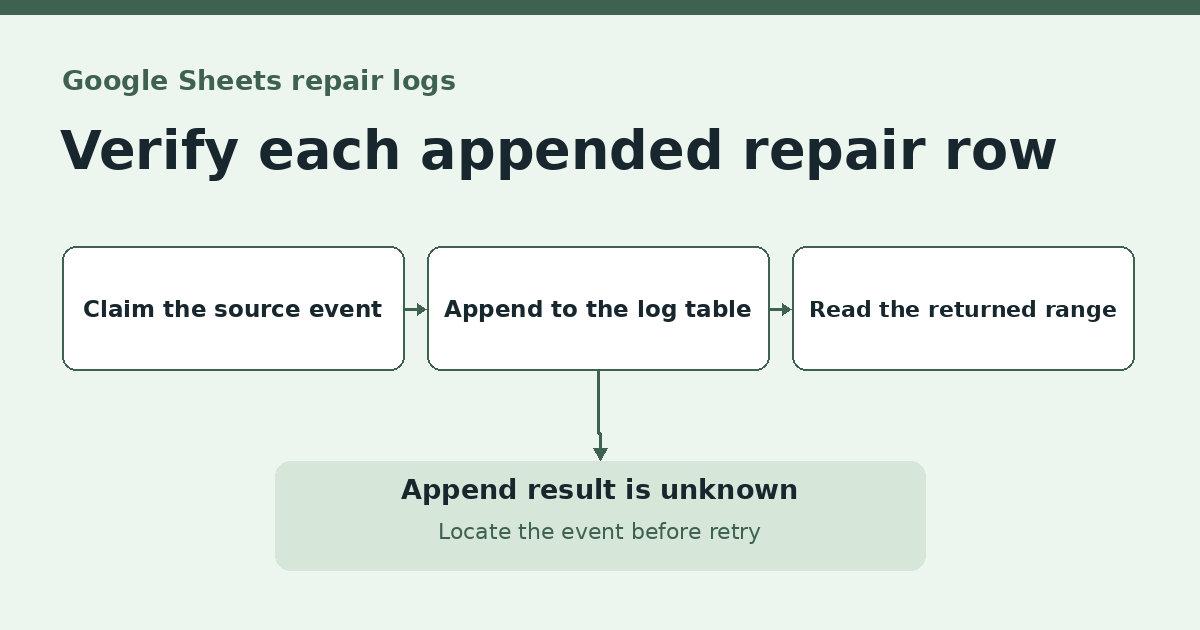
When your Korean workshop appends a repair event to Google Sheets, include a stable event reference and inspect the actual updated range returned by the API. Read that row back before marking the event logged. If the client loses the response, locate the event first before approving another append. [1][2]
Define the log’s table boundary
Use a dedicated sheet with a consistent header and a clearly defined input range. Keep unrelated summaries and staff notes outside the importer’s table. Google documents that the append range is used to find a logical table and the new values go after its last row. It does not promise that the range’s first cell is always the write destination. [1]
Give each inspection event its own source key, such as a fictional work reference and event sequence. Preserve the original event time and the Korea local business date in separate fields if the shift report needs both. Use RAW for text fields when literal storage is intended and verify the resulting value. [3]
Reconcile the append with the event ledger
- Claim the event in a durable internal ledger before sending. Coordinate all import workers using that claim. A spreadsheet search followed by append is vulnerable to two simultaneous workers that both see no matching row.
- Submit the append and record the returned updatedRange. tableRange describes the detected table before the append; use the update details to locate the cells that changed. [1][2]
- Read back the event key and expected values in that range. Mark the event logged only after the comparison succeeds. If several rows or an unexpected location changed, hold the batch for review.
Handle a lost response
Keep the event in an unknown state. Search the complete relevant log area for its key, accounting for any pagination or range limits in your reader. One matching row with the expected values can be adopted after verification. Multiple matches or a mismatched payload need staff review.
If there is no match, confirm that the original request is no longer in flight before authorizing another write. Preserve every attempt under the same event reference.
Test a clean append, a table with a separated notes block, a response lost after success and two workers trying the same event. Check that an uncertain write remains unresolved and a repeated event never becomes a second approved log entry.
Official sources and claim checks
Official source content opened and checked on November 21, 2026 (KST). Operating procedures, safeguards and synthetic test cases are editorial recommendations derived from the documented behavior.
- The requested range identifies a logical table and rows append after that table. The response distinguishes the pre-append tableRange from the updates details. Sheets values.append reference
- The update result includes updatedRange and counts for the cells, rows and columns changed. Sheets UpdateValuesResponse
- RAW and USER_ENTERED control value interpretation, not an exactly-once delivery guarantee. Sheets ValueInputOption