If your Korean store prints shipping labels in batches, put incomplete or ambiguous addresses into a review queue before sending them to the carrier. Use Korea’s official road-name address lookup to check the base address, then confirm apartment or suite details separately. Release the label only after your workflow records an approved version of the address. [1]
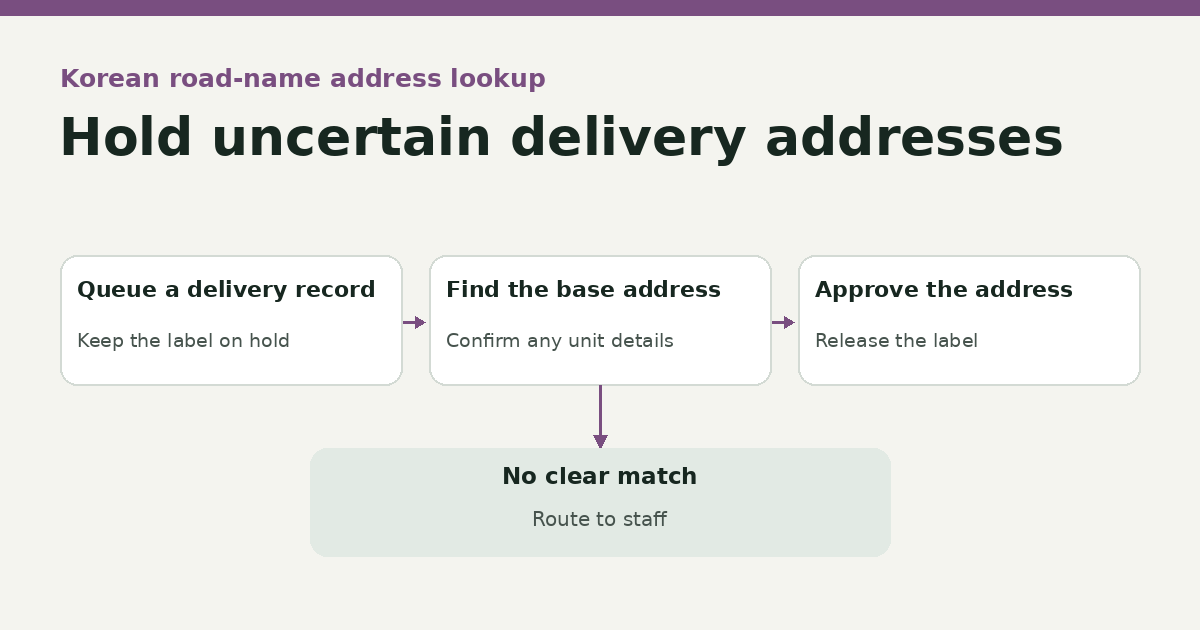
Separate checks you can automate from staff decisions
On order intake, check that the delivery record has a base address. If the buyer indicates an apartment, office suite, or multi-unit building, check whether the required unit information is present. Your form can also flag a blank postal-code field when your carrier importer requires it. Treat these checks as screening rules. They cannot establish that a parcel can be delivered.
Create a review task with the order reference, current address version, and a short reason such as BASE_MATCH_UNCLEAR or UNIT_MISSING. Keep the address in the restricted order view. A shared team notification only needs the order reference and the action to take.
Use the official Korean lookup during review
- Search for the road name and building number first. The official screen also shows building-name and lot-number search examples, which can help staff locate a candidate when formats differ. [1]
- Compare the candidate against the order and any supplied postal code. If older address information is involved, the lookup offers an option to include changed addresses. Confirm that the candidate corresponds to the intended building before replacing anything. [1]
- Check detailed address fields for the intended building and unit. The official lookup separates the road-name address from detailed input. If the unit is unclear, ask the customer through the order’s existing support channel and keep the label on hold until staff confirm the details. [1]
- Save approval against the current address version. If the address changes afterward, invalidate that approval and have the workflow hold any unstarted label task.
Handle exceptions before batch printing
No match, multiple plausible buildings, or an unexplained postal-code conflict should keep the order in review. A failed lookup should leave the task available for staff to retry. If the carrier rejects an approved address, compare the carrier’s required fields with the approved record. If a label already exists, check its status before creating another one.
Dry-run the flow with fictional order references and fabricated matching results. Verify that a single confirmed match creates a preview, an ambiguous match creates a manual task, and an edited address invalidates approval. Keep the carrier upload disabled until the preview and exception list agree.
Official sources and claim checks
Checked on November 15, 2026 (KST).
- The Korean lookup interface accepts a road-name address, building name, or lot-number example. It offers an option to include changed address information and a separate detailed-address input. Road Name Address Information System, official lookup and detail entry
- The official service describes address-search API integration. This article uses official operator lookup and does not depend on an authenticated search API. Korean Address-Based Industry Support Service
Testing and open checks
No live address or courier label was submitted. Building matches, acceptance by a carrier, delivery status, and the approval-key API schema were not tested. The workflow does not make a claim about legal compliance or route coverage. No production account was exercised. Procedures and test cases are based on the cited documentation and use synthetic data.