Category: Automation

  • Apps Script Quota Stops: Resume a Branch Summary From a Checkpoint

    Apps Script Quota Stops: Resume a Branch Summary From a Checkpoint

    If an Apps Script job combines daily summaries for several Korean branches, process a bounded group of inputs and checkpoint confirmed progress after each group. Keep the unfinished report staged until every required branch is reconciled. A quota exception can stop execution, and the next run needs to know what actually completed. [1]

    Separate the business date from the retry schedule

    Give the report a job reference containing the intended Korea local business date. Freeze the source list or record which source revision belongs to that job. A retry after midnight should resume that same report if it is still outstanding.

    Store only the small recovery metadata needed to resume, such as a source key, batch reference and completion state. Apps Script provides persistent property stores with different scopes. Choose one appropriate to the authorized worker and avoid putting customer rows or secrets into diagnostic values. Check the store’s limits before relying on it. [2]

    Bound each execution and persist real progress

    1. Estimate a small initial batch from measured test duration and service calls. Stop voluntarily before the current execution limit with time available to persist a checkpoint.
    2. Stage the batch output under deterministic source keys. Mark progress only after its output is durable. If output and checkpoint cannot be committed together, design the next attempt to reconcile repeated output safely.
    3. Start the next batch from the last confirmed checkpoint. Allow only one active worker for the same job, using a shared claim or lock appropriate to the implementation. Publish the summary after checking every expected branch and any explicit exclusions.

    Distinguish a long run from exhausted daily usage

    A runtime stop and a daily service quota need different recovery timing. Record the exact exception and affected service. If daily usage is exhausted, pause pending work and expose the unfinished report to the operator. Google’s quota page says daily allowances reset 24 hours after the first request and vary by account type; a Korea midnight retry may still encounter the same exhausted allowance. [1]

    Keep the last approved summary visible with its original date. Offer a manual path for urgent branch information while the automated report remains incomplete.

    Test a synthetic multi-branch job with a voluntary stop, a quota exception and an interruption after output but before checkpoint storage. Verify that replay preserves one output per source, retries keep the original business date and an incomplete summary cannot become the approved report.
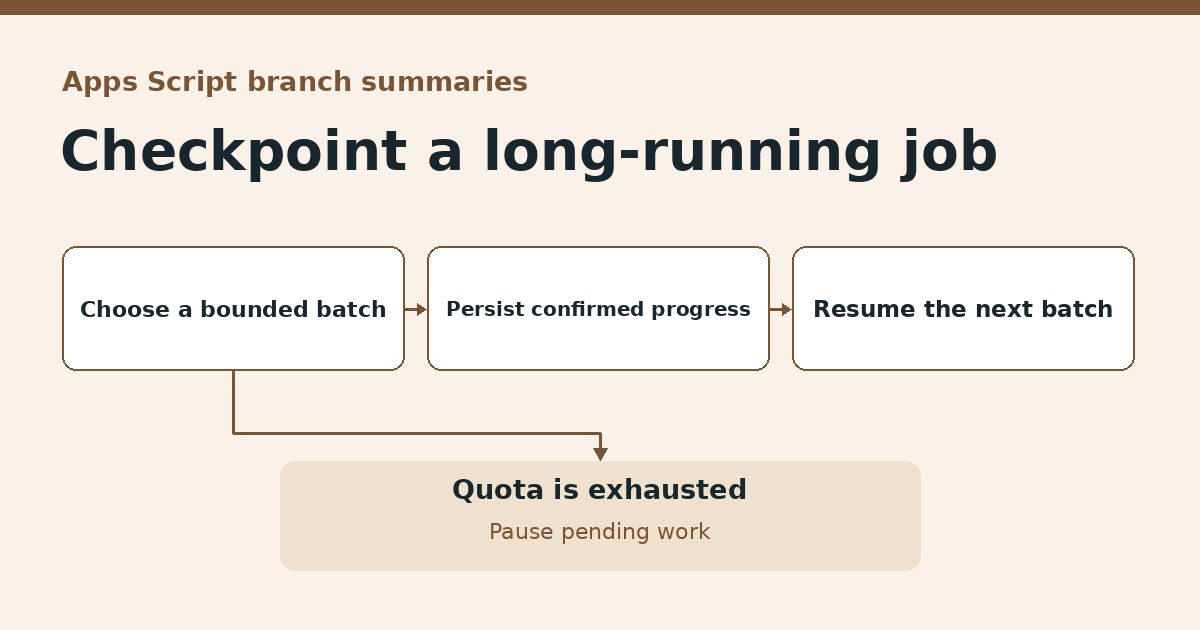
    Apps Script checkpoint diagram choosing a bounded batch, saving confirmed progress and resuming later, with exhausted quota pausing pending work.
    Original diagram of a resumable summary job. This illustration contains no Apps Script screen or branch records.

    Official sources and claim checks

    Official source content opened and checked on November 20, 2026 (KST). The operating procedures, safeguards and synthetic tests are editorial recommendations based on that documented behavior.

    1. Apps Script enforces execution and service limits; quota exceptions stop execution. Account type and associated Google services affect allowances, and daily quotas reset 24 hours after the first request. Google Apps Script quotas
    2. The Properties service provides persistent key-value storage with script, user and document scopes; choose the scope that matches the workflow. Google Apps Script Properties service
  • Google Calendar Watch Renewal: Keep Service-Visit Updates Flowing

    Google Calendar Watch Renewal: Keep Service-Visit Updates Flowing

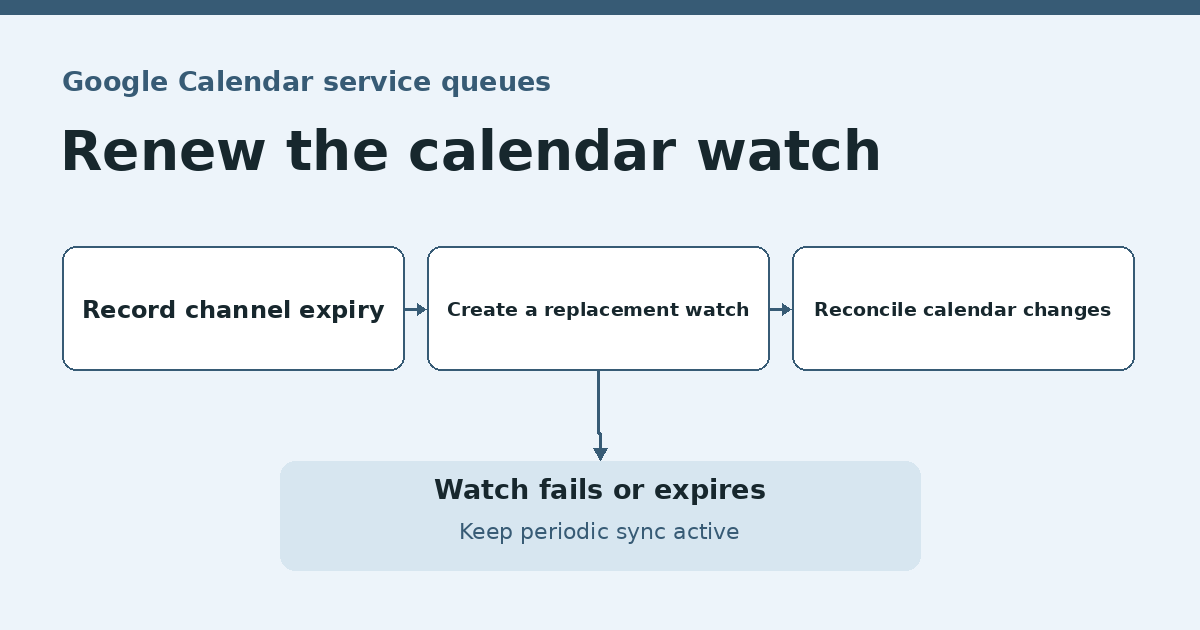
    If your Korean service team depends on Google Calendar updates, record each watch channel’s returned expiration and create its replacement before that deadline. Google requires a new channel ID for the replacement, and the old and new watches can overlap. Keep periodic synchronization active so a missed notification does not leave the dispatch queue silently outdated. [1]

    Keep a watch registry alongside the calendar connection

    For each watched calendar, retain the channel ID, resource ID, returned expiration and the authorized connection that created it. Store any verification token securely and check incoming notifications against the registered channel. Keep calendar names, event details and credentials out of broad error messages.

    Prepare the new channel record before requesting the watch. Google notes that the initial synchronization notification can arrive before the watch response, so the receiver needs to recognize the expected channel during setup. Reconcile the returned identifiers and expiration once the request finishes. [1]

    Replace the channel and reconcile the calendar

    1. Have a renewal worker identify watches approaching their actual expiration. Create the replacement under the same intended calendar connection with a fresh channel ID. Record its successful setup.
    2. Route notifications from both watches to the same calendar synchronization queue during overlap. Coalesce queued sync requests by calendar, and use your existing event identities when applying updates.
    3. After verifying the replacement, retire the previous channel through the documented stop operation when appropriate. Retain the registry history so an operator can explain late notifications from an older watch. [1]

    A notification prompts the worker to fetch current changes. Apply all returned pages before advancing the event mirror’s sync checkpoint. If processing fails, keep that sync job unresolved and expose its last successful completion time to the shift lead. [2]

    Recover from a renewal failure

    If authorization or the receiving endpoint fails, leave an actionable renewal error and continue the scheduled reconciliation path where access still permits it. If access itself is lost, mark the mirror stale and have staff review upcoming visits through their usual Calendar view. Google warns that push messages can be dropped even during normal operation. [1]

    Use a separate test calendar for a fresh watch, an overlapping replacement, a late old-channel notification and a failed renewal. Check that duplicate notifications produce one reconciled event state and that an update is recovered by periodic sync when its notification is deliberately ignored. Keep actual customer messaging disabled for the exercise.

    Calendar watch diagram recording expiry, creating a replacement and reconciling changes, with failure keeping periodic synchronization active.
    Original workflow diagram for Calendar watch renewal. This explanatory illustration contains no Google Calendar screen.

    Official sources and claim checks

    Official source content opened and checked on November 20, 2026 (KST). The operating procedures, safeguards and synthetic tests are editorial recommendations based on that documented behavior.

    1. Watch responses record channel identity, resourceId and expiration. Renewal requires a new watch with a unique ID, channels can overlap, and notifications can be missed. Google Calendar push notifications
    2. Incremental sync provides the mechanism for retrieving changed calendar resources and committing a sync token after a complete result set. Google Calendar incremental synchronization
  • Google Sheets Dispatch Boards: Apply One Batch and Verify the Result

    Google Sheets Dispatch Boards: Apply One Batch and Verify the Result

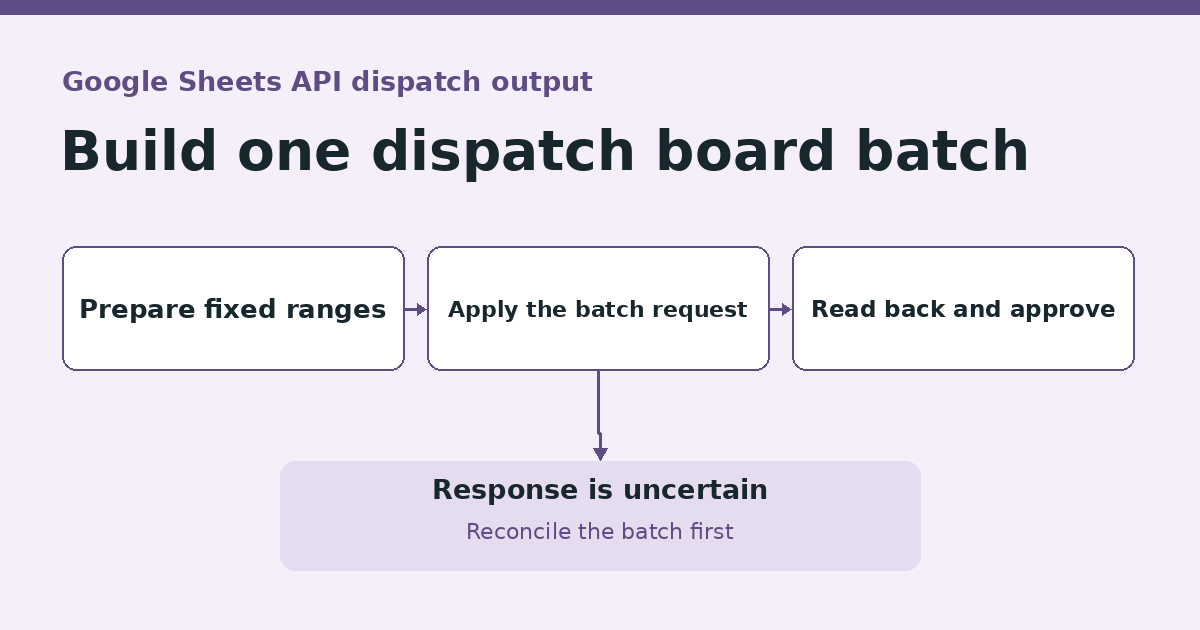
    If your Korean service team generates a Google Sheets dispatch board, group the intended cell and format changes into one bounded spreadsheets.batchUpdate request, then read the affected cells back before releasing the board. Google documents atomic application within that request. Other editors can still change the sheet, so the final read-back matters. [1]

    Build a preview with stable row assignments

    Start from the approved service-visit list and assign a batch reference. Record the target sheet ID, fixed range and the expected visit reference for each row. Keep the board’s time labels in the Korea local business day used by the dispatcher. Use synthetic visit references in the pilot.

    Have the importer own a defined output area. Put staff notes in separate columns and review any layout changes before running another import. A batch that targets old row positions can update the wrong content even when the API accepts it.

    Apply only the intended changes

    1. Prepare the cell values and formatting requests against the expected sheet. Use narrow field masks so an update touches only the fields the importer owns. [2]
    2. Submit the requests together and inspect the API result. If validation rejects one of the subrequests, Google says none of the changes in the batch are applied. Correct the invalid request against the current sheet before retrying. [1]
    3. Read back the visit references, displayed times and batch marker in the affected range. Compare them with the preview. Release the board only when the comparison succeeds and any staff edits have been reconciled.

    The batch’s completion does not establish that downstream dispatch notifications were sent. Track any separate staff notification step under the same batch reference and verify its outcome separately.

    Resolve an unknown result before replay

    If the request times out, first inspect the intended range. The changes may already exist. Avoid replaying append or insert operations solely because the client missed a response. Reconcile with the saved preview, then apply only an authorized correction. Atomicity also applies to that individual request, so splitting a board over several requests requires a separate completion rule.

    Test a valid batch, an invalid field mask, a lost response after application and a collaborator changing one target row. Check that the invalid batch leaves the board unchanged, the lost response is reconciled without another row insertion and an unexpected edit blocks automatic release.

    Sheets dispatch diagram preparing fixed ranges, applying a batch and reading it back, with an uncertain response reconciled first.
    Original diagram of a dispatch-board update. This illustration contains no Google Sheets screen or real service schedule.

    Official sources and claim checks

    Official source content opened and checked on November 20, 2026 (KST). The operating procedures, safeguards and synthetic tests are editorial recommendations based on that documented behavior.

    1. Subrequests are validated before application and updates in one request are applied atomically. Collaborator changes can still affect the spreadsheet’s final visible state. Google Sheets spreadsheets.batchUpdate reference
    2. The guide documents supported cell and formatting requests and field masks for targeting the intended properties. Google Sheets update guide
  • Naver Commerce API 429 Errors: Separate Rate Limits From Seller Quotas

    Naver Commerce API 429 Errors: Separate Rate Limits From Seller Quotas

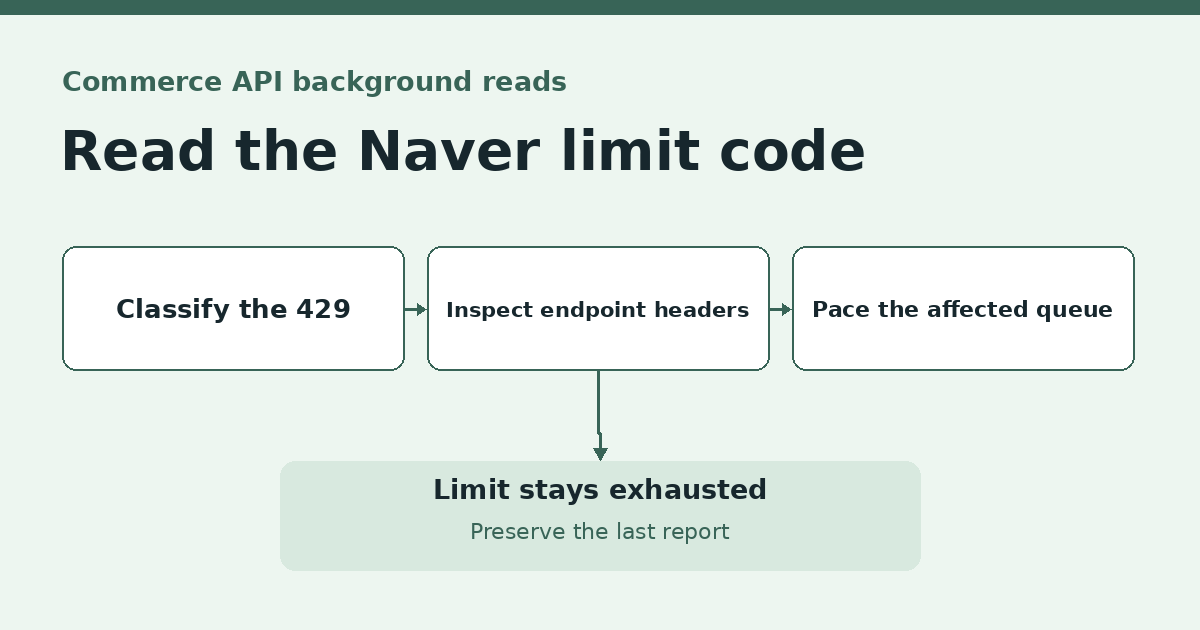
    When a background Naver Commerce API read returns 429, inspect its gateway code before choosing a retry. Naver documents both GW.RATE_LIMIT and GW.QUOTA_LIMIT. Pace the queue according to the affected endpoint or seller allowance, retain the unresolved job and preserve the shop’s last complete report while the new run waits. [1]

    Record enough to identify the exhausted limit

    Log the endpoint class, application reference, seller-resource reference, HTTP status, gateway code, nonsecret limit headers and trace ID. Keep tokens and response customer data out of the shared log. Use the trace ID when an authorized operator needs provider support. [1][2]

    For GW.RATE_LIMIT, review the rate-limit headers returned by that API. Naver applies token-bucket controls per API and authenticated application. Independent workers calling that same bucket need coordinated pacing. A queue’s local sleep cannot control calls from another worker unless both share the same budget. [1]

    For GW.QUOTA_LIMIT, inspect the quota period, allowance and remaining count. Its meaning depends on the solution and seller-resource context. Have the operator confirm that context before applying an assumed reset time. The official page provides separate header families for these limits. [1]

    Recover the affected read queue

    1. Pause new reads that consume the exhausted allowance. Keep other independently budgeted work subject to its own limits.
    2. Choose a bounded retry with spacing appropriate to the confirmed limit. Avoid having several workers retry together. If the allowance still appears exhausted, leave one visible recovery task for the operator.
    3. Resume the unresolved report page or input and deduplicate its staged records by their provider identity. Commit report completion only after all pages and validation results are reconciled.

    A refreshed authentication token solves a different class of error. Use the documented gateway code to route the case to throttling, quota review or authentication recovery. Keep each job tied to its original seller resource. [1][2]

    Test the branches before enabling automatic retries

    With mocked responses, cover a rate limit, a seller quota, an absent header and a repeated 429 until the retry budget ends. Check that an unknown condition reaches review and a failed page cannot replace the approved report. Use a read-only account pilot to measure actual headers and call patterns before adapting this design to writes.

    Naver limit diagram classifying a 429, inspecting endpoint headers and pacing its queue, with continued exhaustion preserving the last report.
    Original diagram of Naver limit handling. This illustration contains no Naver interface, credentials or seller data.

    Official sources and claim checks

    Official source content opened and checked on November 20, 2026 (KST). The operating procedures, safeguards and synthetic tests are editorial recommendations based on that documented behavior.

    1. The official restrictions distinguish GW.RATE_LIMIT from GW.QUOTA_LIMIT, describe token-bucket limits per API and application, and list the rate and quota response headers. Naver Commerce API restrictions
    2. The troubleshooting reference maps gateway status and error codes and identifies trace IDs for investigation. Naver Commerce API troubleshooting
  • Google Calendar Cancellation Sync: Stop Reminders for Withdrawn Service Visits

    Google Calendar Cancellation Sync: Stop Reminders for Withdrawn Service Visits

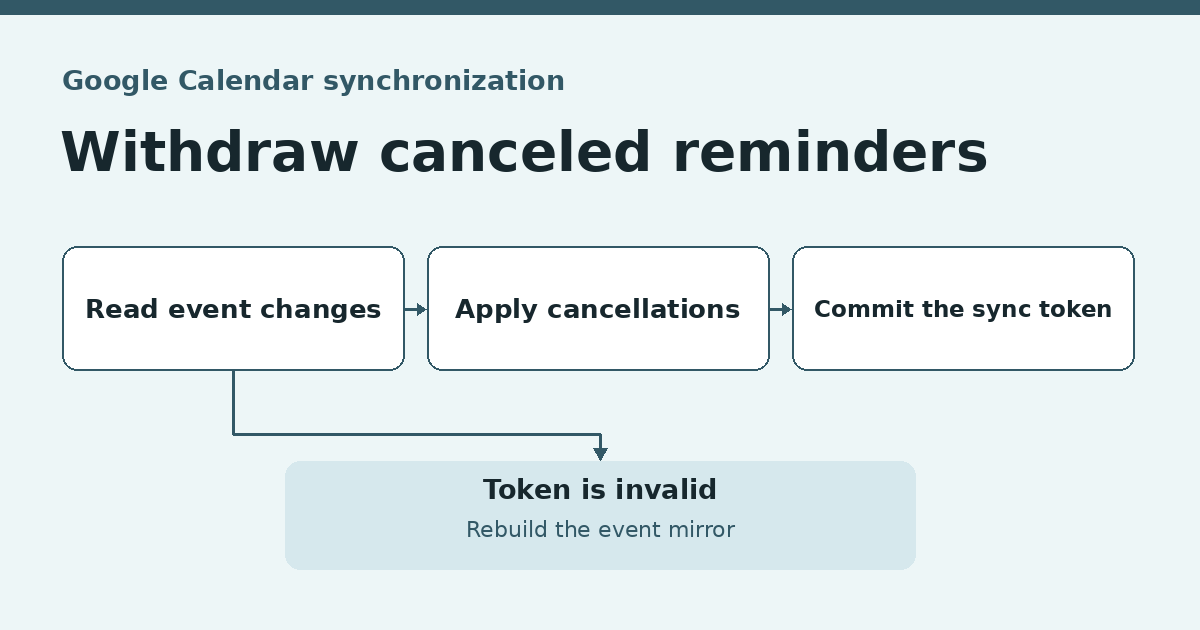
    If a Korean service appointment is canceled in Google Calendar, update your local event mirror and withdraw any unstarted reminders before releasing the next send batch. Use the calendar’s incremental synchronization results to track changes and deletions. Keep a manual review state when synchronization is incomplete so staff can reconcile the upcoming visits. [1][2]

    Keep event identity separate from a phone number

    Bind each reminder to the calendar ID, event identity and scheduled action. For recurring work, retain the series and instance information needed to identify the intended visit. A calendar title or customer phone number is insufficient to distinguish repeated maintenance appointments.

    During initial synchronization, build a staged event mirror and save the final sync token only after processing the complete result set. Use that token on later incremental calls. Keep the request parameters consistent with the provider’s synchronization rules. [1][2]

    Apply changes before releasing reminders

    1. Fetch the next change set, processing every page. Apply an updated visit time to its existing reminder and move a canceled visit into a withdrawn state. Google documents that incremental results include deleted events. [2]
    2. Preserve a record of why the reminder changed. An exception for one recurring visit should be reconciled at the instance level rather than canceling reminders for an entire series without evidence.
    3. Commit the new sync token after the related event and reminder updates are durable. Have the send worker recheck the current local eligibility immediately before release. If cancellation arrives after a reminder has already been sent, route the case to staff for follow-up.

    Recover when the sync token expires

    When the API identifies an invalid sync token with a full synchronization requirement, pause release from that mirror and build a new full copy in staging. Keep the reminder send ledger and previous reconciliation history while rebuilding the event state. Compare upcoming visits against the rebuilt mirror, then resume after staff review any discrepancies. The provider describes this full-sync recovery explicitly. [1][2]

    Use a separate test calendar with fictional visit references. Exercise a one-off cancellation, a reschedule, a canceled recurring instance and a simulated invalid token. Make the sending destination a preview queue. Confirm that canceled visits have no unstarted reminders and a full rebuild never resends a reminder already recorded as sent.

    Calendar workflow reading changes, applying cancellations and committing a sync token, with an invalid token rebuilding the event mirror.
    Original diagram of a cancellation-aware reminder queue. This illustration contains no Google Calendar interface or real appointment.

    Official sources and claim checks

    Official source content opened and checked on November 19, 2026 (KST). Workflow safeguards and example operating procedures are editorial recommendations derived from the documented behavior.

    1. The guide explains initial and incremental synchronization, pagination and recovery from invalid sync tokens. Google Calendar incremental synchronization
    2. Incremental results include deletions. Sync tokens constrain query parameters, and an invalid token requires a new full sync. Google Calendar events list
  • Naver Commerce API Token Renewal: Keep Each Seller’s Background Job Scoped

    Naver Commerce API Token Renewal: Keep Each Seller’s Background Job Scoped

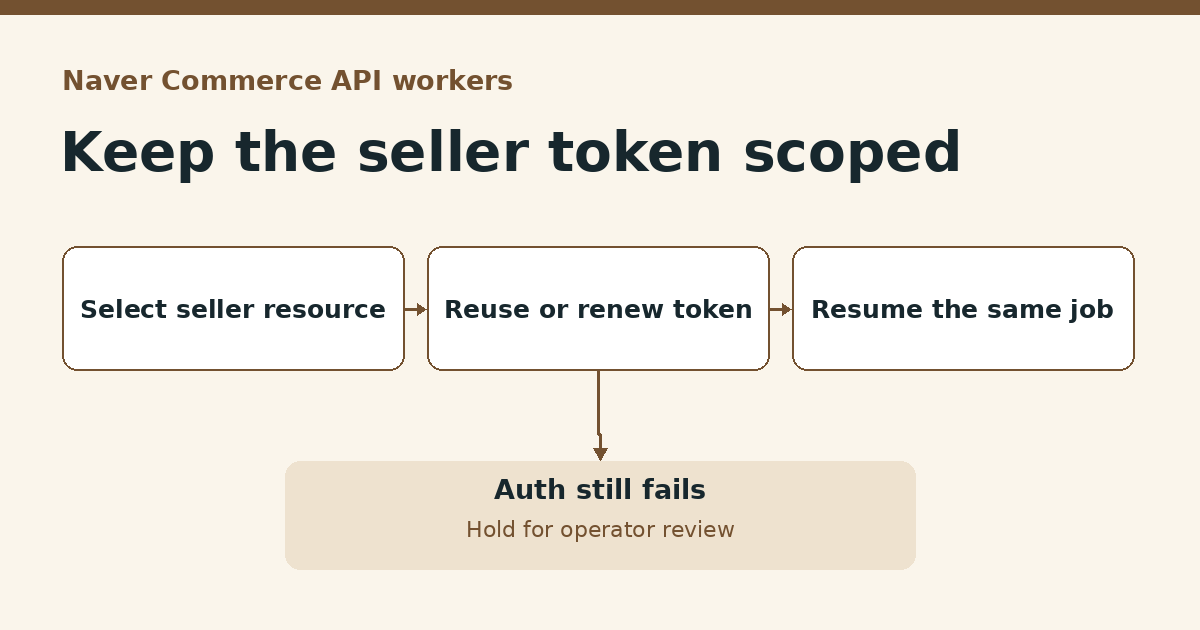
    For a Naver Commerce API job serving a Korean Smart Store, cache the token under the exact resource identity it was issued for and recover authentication before resuming the same job. Naver scopes issuance by type and account_id. Its authentication guide describes refreshing after a 401 response with GW.AUTHN. [1][2]

    Keep the seller context attached to every job

    Record the application, intended resource type, seller identity when applicable and the job reference before requesting a token. Associate cached credentials with that resource key. Have the worker verify the key before making a business request.

    Store credentials in a server-side secret store. Use the documented signing method for issuance and keep signatures, tokens and authorization headers out of support logs. Record nonsecret timing and error codes for diagnosis. The token endpoint’s documentation defines a three-hour lifetime and conditions under which it returns the existing token or issues a replacement. [1][2]

    Recover authentication with bounded work

    1. Before a job starts, retrieve the correct cached token and check its tracked validity. Serialize refresh work for the same resource so several workers do not all request a replacement.
    2. If an API call returns 401 with GW.AUTHN, use the provider’s documented token issuance fallback, then retry the read once under the same seller context. If the error persists, stop that job and route the nonsecret error details to the operator. [2]
    3. If the interrupted operation was a write with an unknown result, read the current destination state and reconcile it against the planned change before replaying it. Renewed authentication alone cannot resolve whether an earlier business action completed.

    Make the overnight failure visible

    For a catalog read that fails after some pages, retain the last complete output and mark the new run incomplete. Resume from a checkpoint appropriate to that endpoint after authentication is restored. Keep partial output from replacing the approved file used by the Korean shop team.

    Use mocked tokens and fictional seller identities to test expiry, a signing error, two concurrent refresh requests and a resource-key mismatch. Confirm that the mismatch prevents a call and persistent failure leaves one actionable task. A later authorized pilot should begin with a read-only endpoint whose result the merchant can verify in Seller Center.

    Naver token workflow selecting a seller resource, reusing or renewing its token and resuming the job, with persistent failure held for review.
    Original diagram of a seller-scoped authentication workflow. This illustration contains no Naver interface, token or credential.

    Official sources and claim checks

    Official source content opened and checked on November 19, 2026 (KST). Workflow safeguards and example operating procedures are editorial recommendations derived from the documented behavior.

    1. The token is scoped by type and account_id, has a three-hour lifetime, and issuance may return the current token depending on remaining validity. Naver Commerce API token issuance
    2. The guide documents server-to-server client credentials, Bearer authentication, signed token requests and a refresh fallback for 401 with GW.AUTHN. Naver Commerce API authentication
  • Google Drive Resumable Uploads: Recover a Repair Video After a Connection Drop

    Google Drive Resumable Uploads: Recover a Repair Video After a Connection Drop

    For a repair video uploaded from a job site in Korea, keep one Google Drive resumable upload session tied to the evidence item. If the mobile connection drops, ask that session how much content it accepted before sending more bytes. Mark the inspection upload complete only after the final file is verified in its intended destination. [1]

    Create one upload record for one piece of evidence

    Assign the video an internal evidence reference and record its byte size, content type, local integrity hash and intended work-order attachment. Freeze the source file during transfer. Store the resumable session URI in restricted application storage so the upload worker can recover its progress. Keep session URLs, access tokens and footage out of shared notifications. [1]

    Use synthetic footage for the first pilot. For actual evidence, have staff review what the camera may capture, who can open the destination and how the uploaded file belongs to the work order. This workflow describes transfer recovery and does not establish a retention rule.

    Recover from an unknown upload result

    1. If the connection fails, retain the upload record and query the session’s status using the documented empty PUT request. Read the server response before deciding where to resume. [1]
    2. For a 308 response, inspect the reported Range of accepted bytes and resume at the correct next position. If there is no accepted range, follow the guide’s recovery procedure for an upload with no acknowledged bytes. Keep the source file and total size consistent. [1]
    3. After a completion response, retain the returned file reference. Verify the destination, byte size and that an authorized operator can play the expected clip before attaching it to the completed inspection.

    Handle an expired session without losing the evidence trail

    When the server says the upload session is no longer usable, reconcile any completion record your application received and any destination candidate before starting a replacement session. Preserve the old attempt as an expired transfer and link the replacement to the same evidence reference. Google documents that an expired resumable session requires a new upload session. [1]

    A duplicate filename is insufficient to identify the right footage. Compare the work-order association and saved evidence metadata, and send uncertain candidates to staff. Hold the inspection task open until the intended file is confirmed.

    Dry-run a mid-file interruption, an accepted final upload with a lost response, and an expired session. Verify that the worker queries accepted progress, avoids overwriting a different work order’s clip and produces one approved evidence attachment.

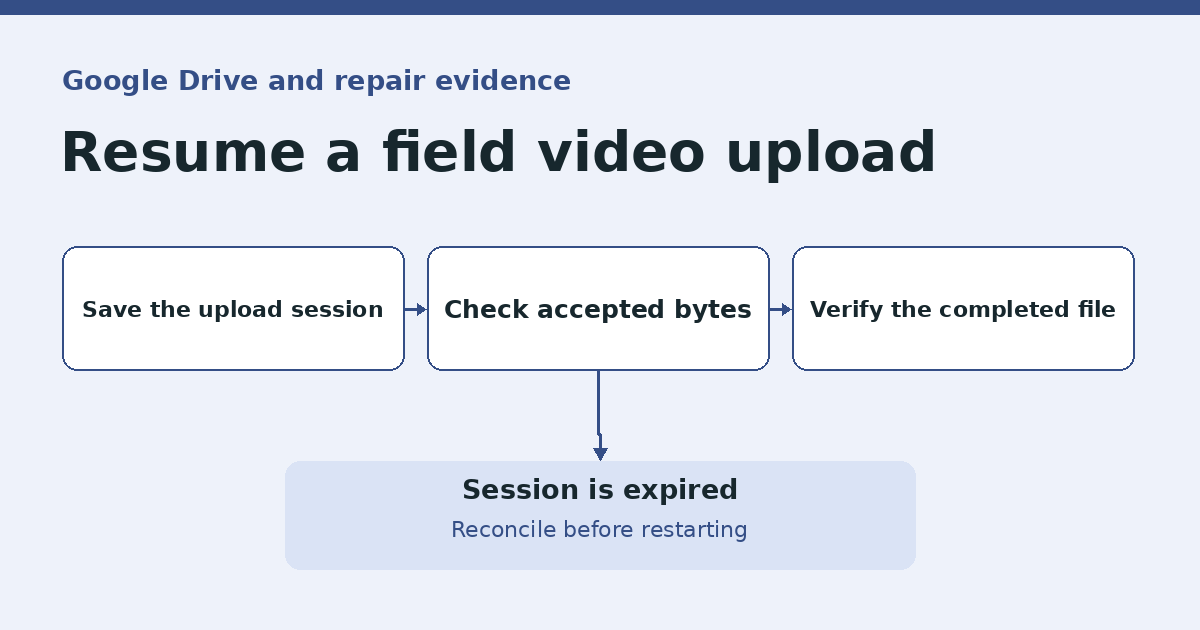
    Repair-video workflow saving an upload session, checking accepted bytes and verifying the file, with expired sessions reconciled before restarting.
    Original diagram of an interrupted video upload. This explanatory illustration contains no Google Drive interface or actual repair evidence.

    Official sources and claim checks

    Official source content opened and checked on November 19, 2026 (KST). Workflow safeguards and example operating procedures are editorial recommendations derived from the documented behavior.

    1. The guide explains resumable upload sessions, status queries, the 308 incomplete response and Range header, and session expiry recovery. Google Drive API upload file data
  • Apps Script Trigger Handoff: Keep a Korean Shop’s Daily Job Running

    Apps Script Trigger Handoff: Keep a Korean Shop’s Daily Job Running

    If a staff member created the Apps Script job that prepares your Korean shop’s daily worksheet, record the trigger’s creator before changing accounts. Google documents that an installable trigger runs as its creator and can be invisible to another account viewing the same project. Plan a replacement trigger under an authorized operator and verify it before the old owner retires their trigger. [1]

    Inventory the job and the account behind it

    Record the script project, target spreadsheet, handler function, event or schedule, expected output and the account that installed each trigger. Ask the current operator to inspect their triggers and identify any similar jobs created by coworkers. A project visible in Drive does not give you a complete inventory of all installed triggers. [1]

    For a Korean daily handoff, also record the project time zone and the local day used for the worksheet. Check whether the handler reads a supplier folder, writes a summary or sends a notification. Have the new operator review access to those specific resources. Keep customer data and credentials out of the handoff notes.

    Test the replacement before switching the active job

    1. Create a test copy with synthetic rows and an isolated output sheet. Have the designated new operator authorize the required services and install the relevant test trigger.
    2. Observe a real trigger event in that copy. Compare the resulting worksheet and run record with the expected local business date. Google documents that time-driven execution can occur within a selected time window, so verify what the business needs when a job has a strict cutoff. [1]
    3. Agree on a cutover window. Pause production side effects, have each known owner disable their retired trigger, install the intended replacement, and confirm one active execution path before restoring output.

    Detect an incomplete handoff

    Give each production business date or input batch a stable run key in the output ledger. Check for a previously completed run before releasing downstream work. For concurrent handlers, the check and claim need a shared atomic mechanism. Treat duplicate-trigger prevention as something to verify in your implementation.

    If the first scheduled output is missing, inspect the execution result and new operator’s access. Google’s trigger guide describes failure notifications, so confirm who receives them as part of the handoff. Keep the last approved worksheet available while you repair the job. [1]

    Test a missing permission, an overlapping old trigger and a failed output write with synthetic data. Check that staff can identify the failed day, reconcile any partial output and resume that job without creating a second worksheet.

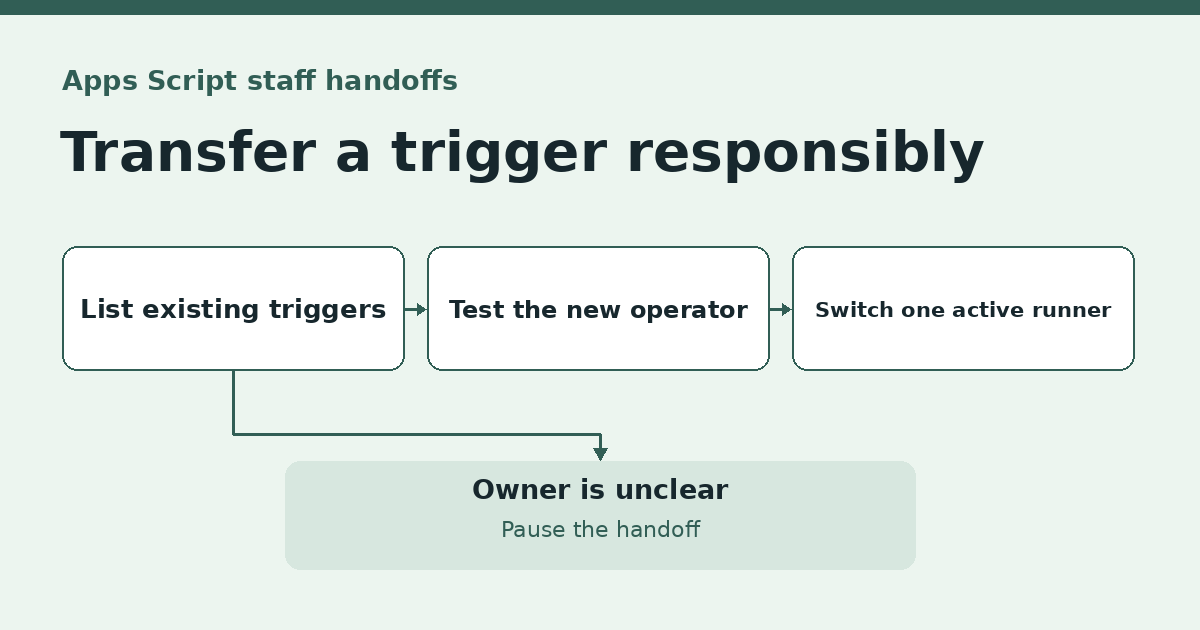
    Apps Script handoff diagram listing triggers, testing a new operator and switching one active runner, with an unclear owner pausing the handoff.
    Original workflow diagram for a trigger handoff. This is an explanatory illustration, not an Apps Script screen.

    Official sources and claim checks

    Official source content opened and checked on November 19, 2026 (KST). Workflow safeguards and example operating procedures are editorial recommendations derived from the documented behavior.

    1. Installable triggers execute as their creator. One account cannot see another account’s installed triggers. The guide also describes time-driven scheduling and failure notifications. Google Apps Script installable triggers
  • NAVER WORKS Bot Alerts: Route Equipment Incidents to the Right Room

    NAVER WORKS Bot Alerts: Route Equipment Incidents to the Right Room

    For a Korean shop that uses NAVER WORKS, map each equipment site to an approved messaging room before connecting its alerts. Send a short incident message using the room’s channel ID and keep staff acknowledgment in a separate incident record. That lets a shift lead see which incidents were posted and which ones still need an owner. [1][2]

    Set up routing before connecting a sensor

    Create a simple table with the site code, supported event types, target room, owner and backup contact procedure. Have a room administrator verify the channel ID from the room menu. Confirm that the bot has joined the approved target room before enabling sends; a channel ID alone does not make the room available to the bot. If membership or the required bot messaging permission cannot be confirmed, keep the route disabled and ask the room administrator to resolve it before testing. [1][2] The Bot API uses a token and documents bot messaging permissions. Keep its credential in the sending service’s secret storage. Use an explicitly approved test room first. [1][2]

    Persist an internal incident reference before sending. A shift team generally needs a branch code, the equipment identifier, detected condition, Korea local time, and a responsible team. Keep customer information and credentials out of the message. Agree on who will update the incident record once someone checks the equipment.

    Post, acknowledge and escalate

    1. Resolve the configured branch and event type to one room. When the mapping is missing or obsolete, pause that route and show the issue in an operator view. A catch-all destination can expose details to unintended rooms.
    2. Have the worker send the approved message through the documented channel endpoint using the bot ID and channel ID. Record the API result and the incident reference. Track staff acknowledgment as a separate step. [2]
    3. Give the incident an escalation deadline. If there is no acknowledgment by then, follow the team’s usual backup procedure and keep the original incident open. Where a send timed out, have staff reconcile the target room before initiating another send.

    Verify with simulated events

    Replay a fictional pump controller fault, missing room mapping, repeated incident signal, and a timeout after a simulated successful call. Check that the invalid mapping causes no send, repeats attach to the same open incident and acknowledgment stops escalation. If a room is replaced, pause the old mapping and pilot the new channel with staff before restoring the route.

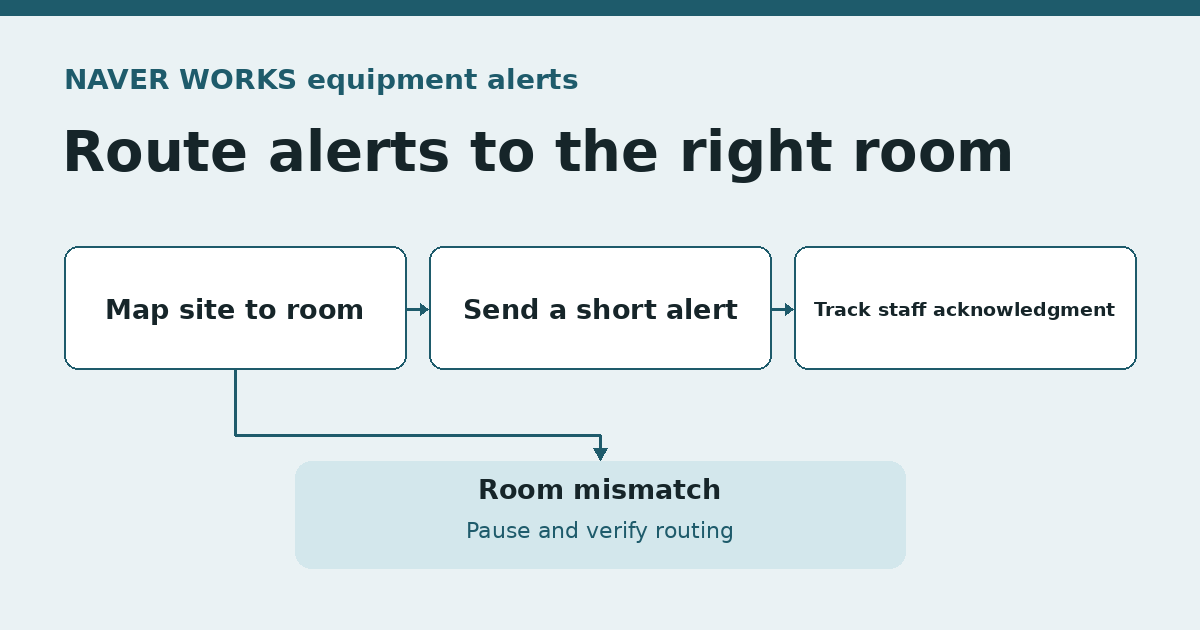
    NAVER WORKS workflow mapping a site to a room, sending a short alert and tracking staff acknowledgment, with a mismatch paused for review.
    Original equipment alert workflow. This illustration contains no NAVER WORKS interface.

    Official sources and claim checks

    Official documentation opened and checked on November 17, 2026 (KST).

    1. The Bot API requires an access token. The bot.message scope covers bot messaging, and the API exposes separate user and room destinations. NAVER WORKS Bot API overview
    2. The documented POST route sends to a room that the bot has joined, identified by botId and channelId. The room menu can provide the channel ID. NAVER WORKS Send Message to a Channel

    Testing and open checks

    No tenant, bot permission, token, message delivery or staff acknowledgment was tested. Confirm your tenant supports the required bot configuration and review the provider’s current limits in the test workspace. Examples and test steps are documentation-based and use synthetic inputs.

  • Coupang Wing Product Imports: Save Listings Before Requesting Approval

    Coupang Wing Product Imports: Save Listings Before Requesting Approval

    If your Korean shop imports products into Coupang Wing through its Open API, use requested=false when creating a listing you want staff to check before requesting sales approval. Coupang documents this value as saving the input only. Your workflow can capture the saved listing for review while someone in Wing checks what would be offered to buyers. [1]

    Build a listing queue that links back to the supplier row

    Assign each input product a stable internal key, and keep the original source row and the proposed catalog values together. Review the required fields against the applicable listing category before any write. Show the price in KRW, the packaging quantity, variants, and the selected shipping and return locations. For a bilingual team, put the Korean storefront text next to a short internal English note so the reviewer sees the exact text buyers would see.

    Start with a preview. Check that requested is explicitly false in the outgoing data. If an import system omits Boolean false during serialization, stop before sending. When the import reports a successful save, record the platform’s listing reference and move the row into editorial or merchandising review. Keep the approval API outside the import worker. [1]

    Reconcile an uncertain save before retrying

    If the create request times out, mark that input row as unknown. Search Wing for the candidate and compare the product name, option set and price against the frozen source row. A matching name alone cannot establish that it is the intended listing. Have staff adopt the matching saved record or investigate before approving a second create attempt.

    After review, submit the intended saved listing through the approved Wing procedure. Keep the states “saved,” “submitted for approval,” and “verified sale status” distinct in your internal report. If staff change the price or options after import, capture the revised values before they approve the listing. [1]

    Test the boundary before sending a batch

    Use a mock destination and synthetic catalog rows. Cover one valid row, one missing category field, one duplicate reimport, and one timeout after a simulated save. Verify that the create request always preserves false and the simulated import never calls the approval step. A later approved pilot can use one listing in a seller-controlled environment, with an operator verifying the saved record before any follow-up action.

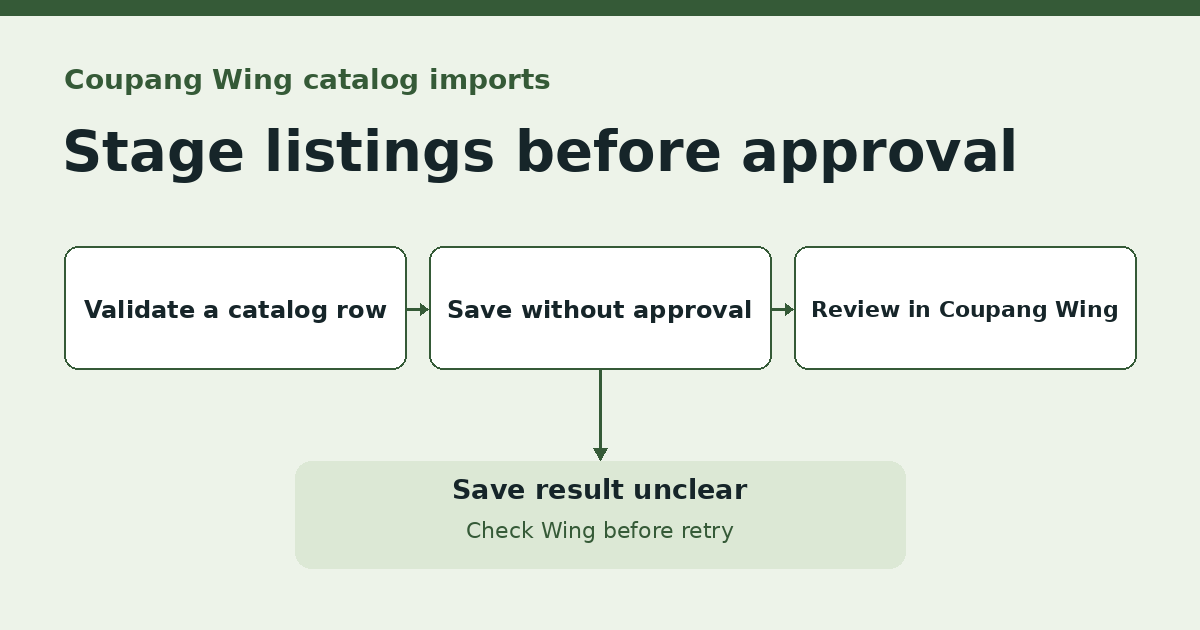
    Coupang catalog workflow validating a row, saving it without approval and sending it for Wing review, with uncertain saves checked before retry.
    Original catalog intake diagram. This illustration contains no Coupang Wing interface.

    Official sources and claim checks

    Official documentation opened and checked on November 17, 2026 (KST).

    1. The current Product Creation API reference documents that requested=false saves the uploaded contents without requesting approval, while requested=true saves and requests sales approval. A saved listing can subsequently be submitted through Wing or the documented product approval request API. Coupang Open API — Product Creation

    Testing and open checks

    No seller account, listing import, approval submission or live sales state was tested. The available guide supports the requested flag; verify your seller integration’s current category schema and any account-specific limits in Wing. Examples and test steps are documentation-based and use synthetic inputs.